Finding, Exploring, Collecting, and Sharing Web Tools!

Firefox Addon's


Today you are going to explore FireFox!!! What is Firefox? Just a search engine?  No! There is more to Firefox than just using it as "just a searching tool". 

I will introduce you to Firefox Add-ons and personas! Then you will explore on your own.

Create two posts:
  • Firefox Add-Ons - what add ons are available, which ones did you add - where does one go to find these add-ons/extensions.
  • Firefox Personas - take a snap shot of your persona - what is a persona, how does someone find a persona for their browser.
Choose from thousands of extra features and styles for Firefox.
Customize your Firefox  to enhance your online shopping, music, bookmarking and much more.

There are several Firefox add on categories - see photo on right.


Have fun!  There are so many neat add on's to make your web experience more enjoyable and easier!!!

Edmodo

Today you are going to be introduced to the Social Networking site called Edmodo.  Edmodo it is a Learning Management System (LMS) for students and teachers.  You will use a code given by Mrs. James to add that class to their Edmodo account.

Edmodo will be used for you to stay organized! All assignments will be posted here.

Edmodo provides a safe and easy way for our Social Media class to connect and collaborate, share content, and access homework, grades and school notices. Edmodo's goal is to help educators harness the power of social media to customize the classroom for each and every learner.  Edmodo was developed in 2008.  The developers believed that we needed to evolve the school environment to reflect the connected world in which we live, and the created a tool that closes the gap between how students live their lives and how they learn in school.

Edmodo is - Anytime, anyplace learning. It allows the teacher to post messages, discuss classroom topics, assign and grade classwork, share content and materials, and network and exchange ideas with their peers - among other things!  

Edomo allows us to make our Social Media class a community!

Qwiki

Qwiki is a website that provides an “information experience.” Key in a topic (search) and Qwiki puts together a multimedia presentation, complete with pictures, videos, and voice-over.

drawz it

Drawzit!
Drawing website (but beware, there is no undo button at this point)  You can share what you draw!

Pixton

pixton.com is a comic strip and book builder!  There are several formats to choose from.  You can also share it with others.


Christmas Fun!!!

http://xmasfun.com/Default.aspx - games, recipes, etc.

http://www.santalady.com/xmasgames.html  - Santa Lady - games, activities, FUN!!!!

 Northpole fun! click on a house to complete an activity

http://www.dltk-holidays.com/xmas/

http://www.apples4theteacher.com/holidays/christmas/scramblers/candycane-stripes.html

http://kids.yahoo.com/directory/School-Bell/Social-Studies/Religion/Christianity/Christmas/Games

http://bogglesworldesl.com/christmas_worksheets.htm

Twiddla

Twiddla is a no setup web based meeting playground!

Mark up websites, graphics, and photos, or start brainstorming on a blank canvas. Browse the web with your friends or make that conference call more productive than ever. No plug-ins, downloads, or firewall voodoo - it's all here, ready to go when you are. Browser-agnostic, user-friendly. 
 
The great thing about Twiddla is that you do not have to sign up. They will automatically create you a guest login but you can still create a meeting on the spot and invite attendees. It is easy to use and a great place for collaboration.

Daily Deal Websites

slickdeals.net
bensbargains.net
Day Heist
1saleaday

Amplify It!

Amplify it is a web highlighter.  It allows you to easily clip, share and discuss things that  interest you.  Click here to visit amplify!


Pageflakes

Pageflakes - is a home or start page - a webpage that loads when you launch your browser. It is possible to add links, search engines, RSS feeds and hundreds of widgets to enhance the time you spend on the web. It's has over 250,000 of these widgets, and people can also publish their own pages directly on the web for other people to view and use - over 130,000 of them in fact. 
widgets

Live Binder!

Organize your online resources by using LiveBinders!  You can share them privately or publicly.  With each tab, the internet website opens directly within the page, you do not have to leave livebinder to see the page.  You will have to install the firefox extension - LiveBinder It! to add tabs, or you can key in the web address!  I love this site!  Watch video here

Font

I love FONTS!!!! Here is a website that a student of mine shared with me today.  You can find a font for several holidays - have fun!!!!!

DaFont

Clipart

Here is a great website to get nice, crisp pictures in various formats:  png, png transparent background, jpeg, etcc.

WPClipart

Pinterest

pinterestPinterest is a virtual pinboard to organize

and share the things you love!

Click here!


I discovered Pinterest, an amazing website that allows  you to “pin” pictures from various websites to your own “boards”.
Rather than email yourself link after link to pictures, you can store all of these pictures in one place on Pinterest by “pinning” them.

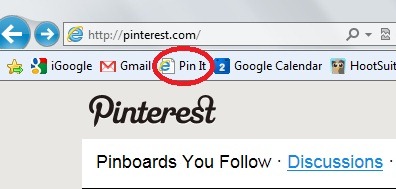
When you are on a webpage, click your Pin It button!  A screen will appear with ALL of the pictures contained on that webpage as well as slideshows!! WOW!! Pretty COOL!!!!!!!!! AMAZING!!!!  Picture to the right is of this webpage!
Warning: Pinterest is highly addicting.
You can find amazing pictures of anything from organization, food and craft ideas to fitness quotes, inspirational sayings, adorable animal photos and wedding ideas! You may then sort these photos into different “boards” so they are categorized and share them with others on Pinterest that follow you. You can also scan boards of people you follow which I did for a million hours on Friday night.

You will have to request an invitation to start using Pinterest.  Just submit your email address and they will send you an invite.  Mine took a few hours.  They sent a confirmation of the request, then sent me a confirmation. YEAH!!


Add the Pin It tool to your bookmarks menu!


Print What You Like

Tired of printing web pages only to find your printout is full of ads, empty space and other junk you don't want?

PrintWhatYouLike is a free online editor that lets you format any web page for printing in seconds!

What is BlogThis! ? - Blogger Help

What is BlogThis! ? - Blogger Help: "BlogThis! is an easy way to make a blog post without visiting blogger.com. Once you add the BlogThis! link to your browser's toolbar, blogging will be a snap. Or rather, a click. Clicking BlogThis! creates a mini-interface to Blogger prepopulated with a link to the web page you are visiting, as well as any text you have highlighted on that page. Add additional text if you wish and then publish or post from within BlogThis!

There are two ways to use BlogThis!: if you use Windows and Internet Explorer, you can use BlogThis! from the SendTo feature of the Google Toolbar. If you're on another browser, just drag the link below to your browser's Link bar. Then, whenever the mood strikes, click BlogThis! to post to your blog:

BlogThis!